![Kairos H 192.png]](https://kb.meetkairos.com/hs-fs/hubfs/Kairos%20H%20192.png?height=50&name=Kairos%20H%20192.png)
What's New
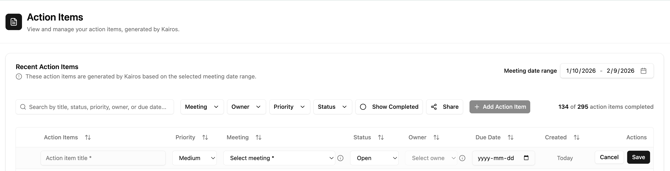
1. Add Action Items Manually
Create new action items straight from the web app. Select a meeting, add a title, assign an owner from the attendee list, and set priority and status.
How to use: Go to the Action Items board → click "Add Action Item" → fill in the details → save.
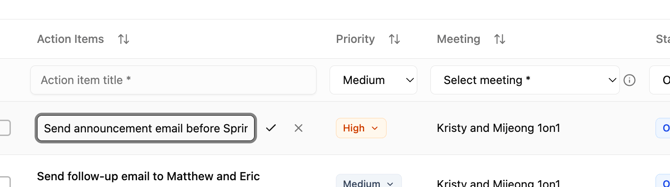
2. Inline Editing for Action Items
Update action items directly from the Action Items board — no more opening modals. Change status, priority, and details in fewer clicks directly in the table.
How to use: Click the field you want to edit directly on the board → edit the content → save.
3. "View More" Link in Meeting Notes Emails
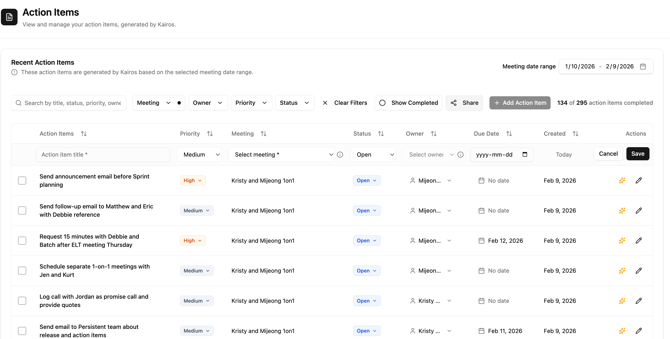
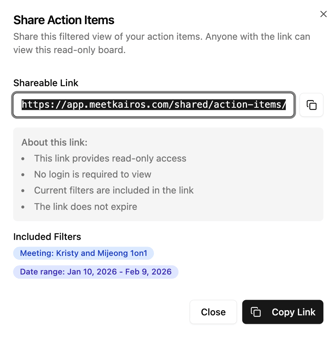
Meeting notes emails now include a "View More" link in the action items section. Click it to jump directly to the Action Items board in the Kairos web app — then share a filtered view with your team.
How to use: Use filters to narrow down action items → click "Share" → copy the link → paste it into email, Slack, Teams, or wherever you collaborate. Recipients see exactly what you see, with real-time updates.
Product Improvements & Bug Fixes
- "View More" link in Meeting Notes emails — Direct link from your meeting notes email to the Action Items board in the web app.
- Kairos Memory enabled for Calendar Audit — Calendar Audit now remembers past context for better recommendations.
- Pop-up Blocker Detection — New detection and instructions during onboarding so pop-up blockers don't interrupt setup.
- Owner column sorting fix — Clicking the Owner column sort toggle now correctly reorders action items alphabetically by owner name.