![Kairos H 192.png]](https://kb.meetkairos.com/hs-fs/hubfs/Kairos%20H%20192.png?height=50&name=Kairos%20H%20192.png)
What's New
1. Meeting Context in the AI Assistant (Action Item Board)
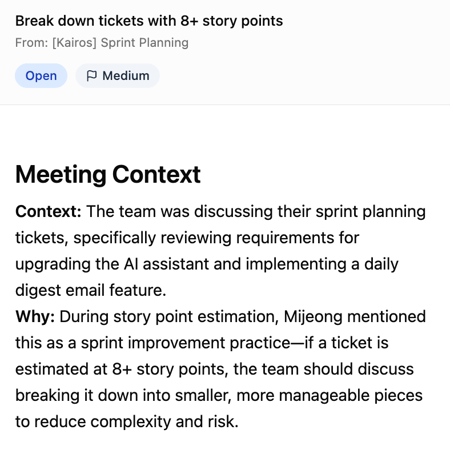
The AI Assistant panel on the Action Item Board now shows why an action item exists. Click into any action item's AI Assistant and get a short context summary pulled directly from the meeting transcript — what was being discussed and why it was raised. No more hunting through meeting notes to remember the backstory.
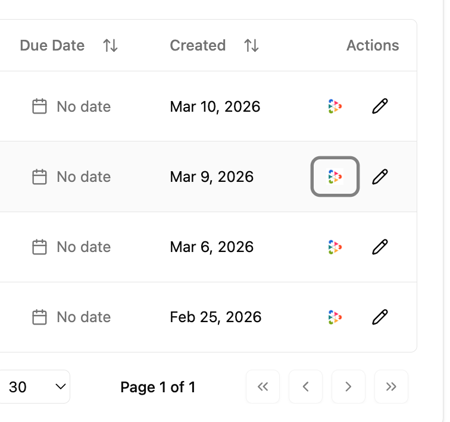
How to use: Go to the Action Items board → click the AI Assistant icon on any action item → read the meeting context summary.
2. New User Onboarding — Intent Question + Guided Setup for Microsoft/Teams
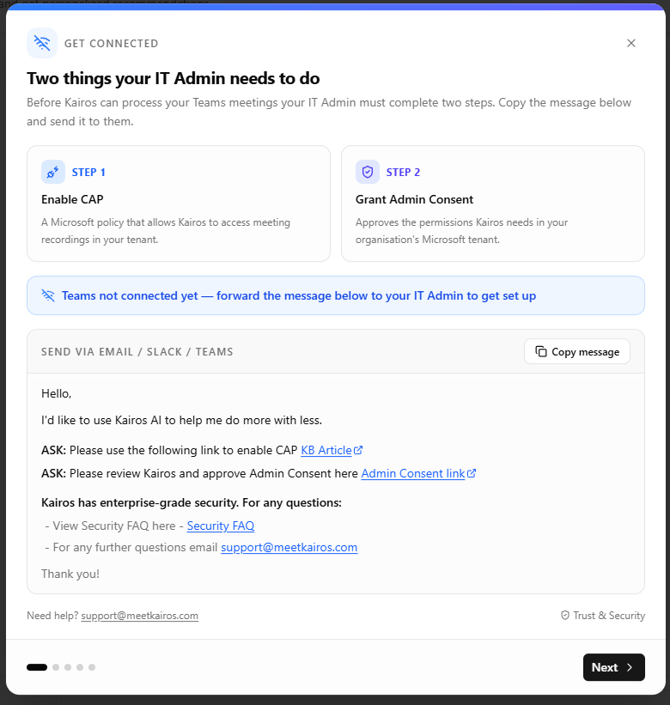
New users now see a quick intent question right after SSO sign-in: "What's the one thing you want Kairos to help you with?" After that, Microsoft/Teams users get a step-by-step walkthrough — how to connect Teams, record meetings, and where to find meeting notes, action items, and Kairos AI chat. Sample previews included so you know what to expect before your first recording.
How it works: Sign in via SSO → tell us your goal → complete onboarding → the guide launches automatically → follow the steps to connect, record, and explore your meeting intelligence.
.png?width=670&height=457&name=image%20(1).png)
.png?width=670&height=573&name=image%20(2).png)
.png?width=670&height=575&name=image%20(3).png)
.png?width=670&height=484&name=image%20(4).png)
Product Improvements & Bug Fixes
-
Updated branding to "Agentic Meeting OS" — Reflected across the web app.
-
Calendar Audit pie chart — The Calendar Audit graph now displays as a pie chart.